NuX Solid Studio IR & Power Amp Simulator
Couldn't load pickup availability
Solid Studio IR & Power Amp Simulator
The New Era of Mic-ing!
NUX Solid Studio was created to address: limited gear availability, and the cumbersome transport reality of physical amp/speaker cabinets.
Over many years of research, Solid Studio was specifically developed to fill the essential needs of discerning musicians and sound technicians, including the art of mic-ing instrument amplifiers on stage or in the studio. Solid Studio provides ease-of-use, reliability, versatility, and, above all, incredible audio quality.
Virtual mic-ing is achieved by choosing 1 cabinet and 1 microphone, and fine-tuning the position of the microphone using the mic position switch. Plus, you can add the tube sound by engaging the power amp simulation.
What's Inside?
Solid Studio comes with 8 speaker cabinet simulations. All the cabinet models inside the Solid Studio sound and feel as great as their original counterparts.

And there are 8 microphone models you can combine with any cabinets. Also, you can adjust microphone position for fine tuning.

Solid Studio Power Amp Simulation offers three power tube models that deliver corresponding tonal characteristics: EL84, LE34 and 6V6.

Input/Outputs
NUX Solid Studio has a 6.35mm mono input with an input signal level toggle switch (-10dB / +4dB) for fitting various instruments. And it has 3 outputs: simulation dedicated (TRS) STEREO OUTPUT and DI OUT, and a bypassed “THRU” output.
Connection Tips
Solid Studio offers a variety of connection solutions to give you correct guitar tones with or without a real speaker cabinet.
Gig Saver
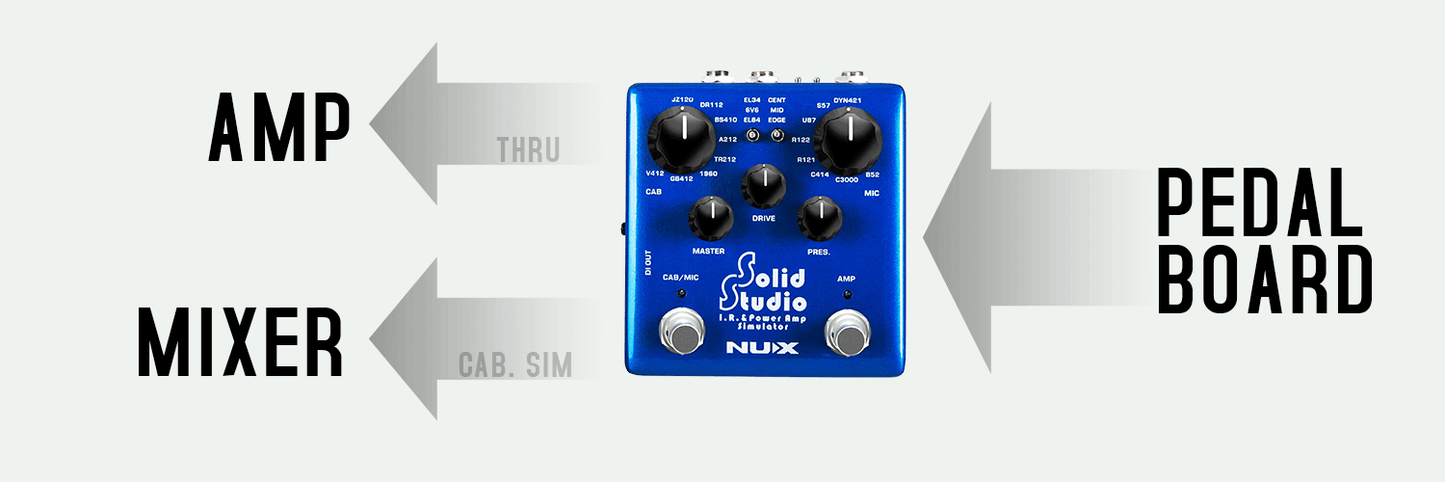
– You can place the Solid Studio at the end of your pedal board, and you can send the simulated sound to the mixer while you can send your original signal to the amp. It’s an alternate option for amp / cabinet mic-ing on stage.

Loader: Solid Studio
The Solid Studio’s IR resolution is 2048 samples and 46ms, which is higher than the common quality standard that most of IR loaders are using today: 1024 samples and 20ms capturing length. Some well-known profiler devices offer 2048 samples / 40ms length.
What makes the Solid Studio standout? It offers 46ms length which means it can perfectly read all the frequencies. Comparing the length, 20ms is already enough to capture a sound profile with an efficient result but it’s not enough to catch the lower frequencies. That’s why devices with high-quality usually provide 40ms length – it means higher resolution and better quality.
The highest resolution quality limit of the IR is 50ms, it is the REAL sound.Considering all the process on the signal from your guitar to your ear, Solid Studio delivers the signal faster than the blink of an eye with the greatest result. Thanks to Solid Studio’s high-quality processor and perfect algorithm, the signal latency from input to output is less than 1ms.
Many of the IR loaders’ signal latency is around 2ms, and each additional digital pedal in the signal chain also increases the latency. For example, the fastest multi-effect pedal needs 2ms to deliver the sound, if you use an IR loader together with this multi-effect pedal, the total latency will be 4ms and a guitar player can ~barely~ feel that. If it’s more than 5ms it’s obviously slow and it’s not able to play.
IR Capture
You can capture any speaker’s profile easily with Solid Studio. Create your own IR file and save it.
First, make all the connections (you can see the picture below):
– Adjust the microphone position and connect to the Mic Preamp.
– Mic Preamp Output to Solid Studio Input.
– Solid Studio Output to Power Amp in / Return.
Now follow these steps:
– Push and hold both footswitches on Solid Studio and plug in the power cable. Solid Studio will start running in IR capturing mode
– Select the save position on Solid Studio, you can dial up any preset you want. Choose a speaker cabinet, mic position and a microphone (and please note it). This will be your preset recall position as long as you keep the file here. 8 Speaker Cabinets x 3 Microphone positions x 8 Microphones = 192 dial up positions
– Press CAB/MIC footswitch ~ and it will capture the profile. Usually it takes couple of seconds, just wait until the LED’s stops blinking.
Your very own Impulse Response file is ready to rock!
NUX PA-50 Full-Range Flat-Response Personal Monitor (FRFR)
You can get the real experience of Solid Studio with NUX PA-50 Personal Monitor, the second channel of the monitor is a Full Range Flat Response input. When you connect the Solid Studio thru that input, you can get the characteristic sound of the selected speaker profile from built-in or loaded IR file. NUX PA-50 can reflect any of your favorite speaker cabinet sound.
– 8 Speaker Cabinets.
– 8 Microphones and 3 Mic. Positions.
– 3 Power Amp Tubes.
– Master, Drive and Presence Controls (Power Amp).
– Simulation Dedicated Output and DI Out.
– Thru Output.
– Thru Output Modes (Line/Speaker).
– Input Level Switch (-10dB/+4dB).
– USB Port for loading 3rd party IR files, software control and firmware update.